
Written by ZufishanMS Environmental ScienceLast reviewed
What is a weighted grade?
A weighted grade is a course average where each component contributes a set percentage of the total. A 30% final exam has three times the impact of a 10% homework set on your overall grade, no matter how many individual assignments sit in each category.
Most college and university syllabuses use weighted grading. The weights are set by the instructor and listed in the course outline. This calculator applies those weights for you, so you always know your real standing in the course.
Reading your current grade result
Your overall grade appears as a percentage and a letter grade using the standard US plus-minus scale:
| Percentage | Letter grade | Grade points (4.0) |
|---|---|---|
| 97 to 100 | A+ | 4.0 |
| 93 to 96 | A | 4.0 |
| 90 to 92 | A− | 3.7 |
| 87 to 89 | B+ | 3.3 |
| 83 to 86 | B | 3.0 |
| 80 to 82 | B− | 2.7 |
| 77 to 79 | C+ | 2.3 |
| 73 to 76 | C | 2.0 |
| 70 to 72 | C− | 1.7 |
| 67 to 69 | D+ | 1.3 |
| 63 to 66 | D | 1.0 |
| 60 to 62 | D− | 0.7 |
| Below 60 | F | 0.0 |
Some institutions use a simpler scale without plus and minus modifiers. Check your syllabus for the exact grade boundaries your instructor uses.
How is a weighted grade calculated?
For each item, divide your score by the maximum possible score to get a decimal, multiply that by the item's weight, then add all the results together.
Formula: Course Grade = Σ[(Score ÷ Max Score) × Weight] across all items
Step-by-step example: calculating your current grade
A course with four graded components:
| Item | Score | Max | Weight | Contribution |
|---|---|---|---|---|
| Homework | 45 | 50 | 20% | (45 ÷ 50) × 20 = 18.0 |
| Midterm | 72 | 100 | 30% | (72 ÷ 100) × 30 = 21.6 |
| Project | 88 | 100 | 20% | (88 ÷ 100) × 20 = 17.6 |
| Final exam | 79 | 100 | 30% | (79 ÷ 100) × 30 = 23.7 |
| Total | 100% | 80.9% (B−) |
The midterm and final exam each carry 30%. A weak performance on either one pulls the average down far more than a weak homework result would.
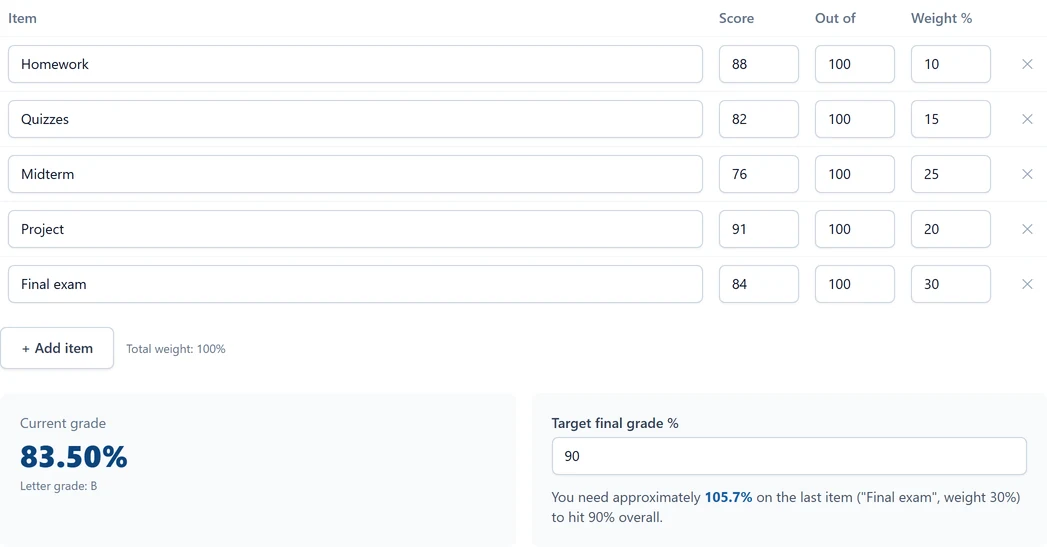
How to calculate your current grade with this calculator
- Add a row for every graded item in your course.
- Enter the score you received and the maximum possible score for each row.
- Enter the weight of that item as a percentage, pulled from your syllabus.
- Watch the total weight indicator. It should reach 100%.
- Read your current overall grade and letter grade in the result panel below.
Item names are optional but helpful for keeping track when your course has many components.
Common grading structures
| Course type | Typical weight breakdown |
|---|---|
| Lecture course | Homework 20%, Midterm 30%, Final 40%, Participation 10% |
| Lab science | Lab reports 30%, Quizzes 20%, Midterm 20%, Final 30% |
| Project-based | Projects 60%, Presentations 20%, Final 20% |
| Standards-based | Each standard weighted equally; check your syllabus for exact values |
When to use the Grade Calculator: Current Grade From Your Scores
Use it at the start of a semester to map out your grade structure from the syllabus and see how much each component matters. Use it mid-semester to check your standing after each graded item is returned. Near the end of term, the required-score panel tells you what you need on the final exam. For a focused version of that, use the Final Exam Calculator. To convert your final percentage grade into a GPA point, use the GPA Calculator.
Common mistakes when calculating your current grade
Using the wrong weights. Always pull weights from the official syllabus, not from memory. Instructors sometimes adjust weights during the semester, so check for any announcements before running the calculation.
Entering raw points instead of weight percentages. The Weight column needs the percentage that item contributes to your final grade, not the number of points it is worth. A 50-point homework set with a 20% course weight gets “20” in the Weight column, not “50”.
Forgetting to include all components. If your weights only add up to 70%, the remaining 30% is unaccounted for and your result will be lower than your actual grade. Check that the total weight indicator reaches 100%.
Including a dropped score. If your instructor drops the lowest score in a category, leave that row out entirely. Including it will pull your grade lower than it should be.
Every grade calculator on this site
This page is the general-purpose tool. If your question is more specific, one of the calculators below is built for it, and each one uses the same weighted-average math but exposes only the inputs that situation needs.
- Course Grade Calculator: overall grade for one course from its homework, quiz, midterm and final components
- Semester Grade Calculator: your overall grade across every course in a term
- Weighted Grade Calculator: a weighted average when you already have percentages, without score and max-score rows
- Final Exam Calculator: the exam score you need to reach a target grade
- Passing Grade Calculator: the minimum score that still passes the course
- Test Average Calculator: a plain mean of your test scores
- Quiz Grade Calculator: average quiz scores, with the option to drop the lowest
- Assignment Grade Calculator: points earned on one assignment to a percentage and letter
- Extra Credit Calculator: how many bonus points it takes to reach the next letter grade
- Class Average Calculator: mean, high and low score for a whole class
- Grade Curve Calculator: apply a flat curve to any set of scores
- Exam Percentage Calculator: marks obtained on an exam to a percentage
- School Percentage Calculator: overall percentage across all subjects on a report card
- Grading Scale: the percentage behind every letter grade and its 4.0-scale points
- GPA Calculator: turn your final course grades into a semester GPA on the 4.0 scale
- Weighted GPA Calculator: high-school GPA with honors and AP/IB bonus points, weighted and unweighted
Disclaimer: Results are educational estimates based on the weights and scores you enter. Your institution may calculate grades differently, apply curves, or round differently. Always confirm your official grade with your instructor or institutional gradebook.